မန္ဘာေလးဝင္းေပးခ်င္းျဖစ္ကူညီေပးပါ

Tuesday, December 29, 2015

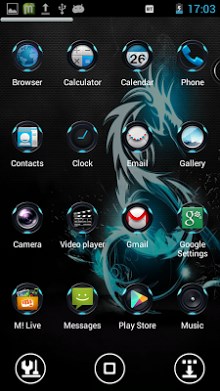
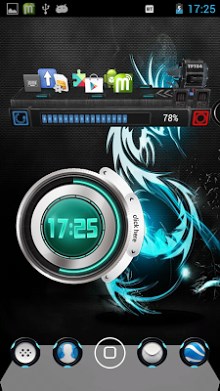
Zenith Next Launcher Theme


Zenith Next Launcher Theme-2
Zenith Next Launcher Theme-1Zenith Next Launcher 3D Theme

High quality, new ultra-detailed theme for Next launcher 3D. Great icons and matching wallpapers included!
[ INTRODUCTION ] Zenith theme, designed for Next Launcher 3D! Download it and have a complete makeover of your smartphone!
Next Launcher 3D Shell must be installed to apply the theme. Next Launcher 3D can be found in Google Play Store by (GO DEV Team). [ MAIN FEATURES ] # A very cool and innovative icon base.
# The theme has many icons which covers the main apps of the phone like SMS, email, contacts, and a lot more.
# Wallpapers of the topic have been added by default.
# Supports 3D mode (Pro version only)
You can get the pro version from playstore. [ APPLYING THEME ] Press menu on your desktop – > Themes – > Installed -> Select theme Zenith.
Optional step:-
If you want to choose another wallpaper included in the theme, apply the theme. Then,
Goto Dock-> Wallpapers -> Next Wallpapers -> Swipe left or right to use your favourite wallpaper. [ COMMENTS AND RATINGS ] If you like my work, please give a rating to my  Size : 4.0M
Current Version : 1.0.0
Requires Android : 1.6 and up

                                   DOWNIOAD

Theme ၾကိဳက္ႏွစ္သက္သူမ်ားအတြက္

                
Theme ၾကိဳက္ႏွစ္သက္သူမ်ားအတြက္
ေရးေနေတာ့ဘူးဗ်ာလိုခ်င္းရင္ယူတာသြားေတာ့


      https://my.pcloud.com/publink/show?code=XZ706RZ3JacRUv11CQiKgBdc2aHsS1YMRBX

Tuesday, October 13, 2015

Android ဟူသည္အဘယ္နည္း ႏွင့္ Android သမိုင္းေၾကာင္း


Android သမိုင္းေၾကာင္း

Android ကို Google က ပိုင္ဆိုင္ပါတယ္ google ဆိုတာကေတာ့ အင္တာနက္ သံုးသူတုိင္း

မသိသူမရွိေလာက္ပါဘူး။ Google က 17.8.2005 ခုႏွစ္မွာ Android Inc ကို၀ယ္ယူခဲ႕ပါတယ္။ သူထုတ္ခ်င္တာ က မိုဘိုင္း device ေတြေပၚမွာသံုးဖို႕ OS တစ္ခု ထုတ္ခ်င္တာျဖစ္တဲ႕ အတြက္ Android ကို စအေကာင္အထည္ေဖာ္ခဲ႕တဲက Android Inc ကို၀ယ္ခဲ႕တာပါ။

ဒါေပမယ့္ အခ်ိန္အတန္ၾကာ ၿငိမ္ေနခဲ႕ပါတယ္ သူစီးပြားေရးေစ်းကြက္ကို ဘယ္လုိ၀င္ရမလဲ စဥ္းစားေနတာေနမွာေပါ့ ဒါေပမယ့္ 2007 ခုႏွစ္ ဇန္န၀ါရီလ ၉ ရက္ေန႕မွာပဲ iOS နဲ႕ေမာင္းႏွင္တဲဲ႕ iPhone ကို စတင္မိတ္ဆက္ေပးခဲ႕ၿပီး ေအာင္ျမင္မႈမ်ားစြာ

ရရွိခဲ႕ပါတယ္ အဲဒီအခ်ိန္က စၿပီး Google ကလည္း Android ကိုအေကာင္အထည္ေဖာ္ ဖို႕အတြက္ 2007 ခုႏွစ္မွာ Open Handset Alliance (OHA) ဆိုတဲ႕ အဖြဲ႕ကို ထူေထာင္လိုက္ၿပီး ၂၀၀၈ မွာ Android ကိုစတင္ပြဲထုတ္ခဲ႕ပါတယ္။

အခုလူေတာ္ေတာ္မ်ားမ်ားကေျပာၾကပါတယ္ Android က iOS ကို ၿပိဳင္ဆိုင္ ဖို႕ထြက္လာတာပါ ဆိုတာပါ။ ဒီဟာက အျပည့္ အစံုေတာ့ မမွန္ပါဘူး။ ဘာေၾကာင့္လဲဆိုေတာ့ Google က iOS စထုတ္ၿပီးေတာ့မွ Android စျဖစ္လာတာမဟုတ္ပါဘူး လြန္ခဲ႕တဲ႕ ၂ ႏွစ္ေလာက္ကတည္းက Android ကို၀ယ္ယူခဲ႕တာပါ။ သို႕ေသာ္ iOS ထုတ္လိုက္ေတာ့ သူလည္းထုတ္သင့္တဲ႕အခ်ိန္ေရာက္ၿပီ ဆိုေတာ့ထုတ္လို က္ တာလည္းျဖစ္ႏိုင္ပါတယ္။ Android ရဲ႕ Logo ေလးကေတာ့ လူေတာ္ေတာ္မ်ားမ်ားျမင္ဖူးေနတဲ့ စက္ရုပ္ပံုအစိမ္းေလးပဲျဖစ္ပါတယ္။

Monday, September 28, 2015

Mail.com mail


mail.com mail-1 mail.com mail-2
The mail.com App for your mobile.
The mail.com app gives you the best experience for your mail.com account and all your other accounts (e.g. hotmail, yahoo or googlemail). Enjoy features like pinch to zoom for html mails and get the best overview in our unique fullscreen mode. Set a customized quiet time for when you don’t want to be notified by incoming messages.
It is simple, fast and secure using advanced encryption technologies (TLS, SSL). Send and receive mails via IMAP, POP and SMTP from all of your mail accounts. You can simply attach a photo or several pictures to any mail.
mail.com is the best fully functional multi mailer app for android.
Link

✔Android ကုိ ေမ်ာက္ကုိက္ျခင္းError(2)✔


PCမလိုပဲmonkey testနဲ႔time serviceကို
system app remover ဆိုတဲ့apkကိုအသံုးျပဳ
ျပ​ီး​ေျဖ႐ွင္​းနည္​းျဖစ္​ပါတယ္​-

-ဒီနည္​းကိုအသံုးျပဳဖို႔အတြက္​မိမိတို႔ဖုန္​းဟာအရင္​ဆံုး
Rootedရ႐ွိၿပီးျဖစ္​ဖို႔​ေတာ့လိုပါမယ္​။
Rootedမ႐ွိထားတဲ့ဖုန္​း​ေတြဆိုရင္​​ေတာ့
monkey testနဲ႔time service app​ေတြကို
Disable လုပ္​​ေပးပါ။အၿပီးသတ္​႐ွင္​းထုတ္​ခ်င္​ရင္​
ဖုန္​းကိုrootလုပ္​ၿပီး႐ွင္​းထုတ္​ပါ။rootမလုပ္​ခ်င္​ရင္​
firmwareဖန္​းဝဲလ္​အသစ္​ျပန္​တင္​ၾကည္​့ပါ-

-တကယ္​လို႔ဖုန္​းကိုrootမလုပ္​ရ​ေသးပါက
NewKingroot Apkကိုအသံုးျပဳၿပီးrootျပဳလုပ္​
လိုက္​ပါ။NewKingroot v4.50 Apkကို​ေအာက္​က
လင္​့ခ္​မွာ​ေဒါင္​းလုပ္​ဆြဲလိုက္​ပါ-

NewKingroot v4.50 Apk
DOWNLOAD

king root apkထဲဖြင္​့ဝင္​၍အင္​တာနက္​လိုင္​း
ခဏဖြင္​့​ေပးထားၿပီးrootingျပဳလုပ္​ပါ-

-ၿပီးရင္​ Root ​ရ/မရ ကိုစစ္​​ေဆးဖို႔အတြက္​
RootChecker Apk ကို​ေဒါင္​းၿပီးinstallၿပီး
apkထဲဝင္​၍Verify device statusဆိုတဲ့
စာသား​ေနရာကိုႏိွပ္​၍စစ္​​ေဆးၾကည္​့ပါ။
စစ္​​ေဆးၾကည္​့လို႔ Root
​ေအာင္​တယ္​ဆိုရင္​ ​ေအာက္​ဆံုးနာက
Device State: ​ေဘးမွာအနီ​ေရာင္​စာသားနဲ႔
Rooted! လို႔ျပ​ေပးမွာျဖစ္​ပါတယ္​။

တကယ္​လို႔
Sorry!
This device does not has
Proper root access
လို႔ျပ​ေနရင္​​ေတာ့Root​ေဖာက္​တာမ​ေအာင္​ျမင္​ပါဘူး★

-RootCheckerPro v1.5 Apk အား​ေဒါင္​းရန္​-
DOWNLOAD

-မိမိဖုန္​းဟာrooted accessရ႐ွိၿပီးသြားၿပီဆိုရင္​
system app remover apkကိုအသ​ံုးျပဳ၍
monkey testနဲ႔time serviceကိုဖ်က္​ထုတ္​ပစ္​
ရပါမယ္​-

-System App Remover Proအား​ေဒါင္​းရန္​-
-​ေဒါင္​းၿပီးသြားရင္​system app remover apk
ကိုဖုန္​း​ေပၚinstallလုပ္​ၿပီးappထဲဖြင္​့ဝင္​ပါ။
root​ေတာင္​းရင္​allow/grand ​ေပးလိုက္​ပါ။
ျပ​ီးရင္​Menu Manager​ေအာက္​ကSystem App
​ေနရာကိုႏိွပ္​ဝင္​လိုက္​ပါ။အဲ့ဒိမွာကိုယ္​့ဖုန္​းထဲမွာ႐ွိတဲ့
system app​ေတြ​ေတြ႕ရပါမယ္​။
အဲ့ဒိထဲကMonkey Testနဲ႔Time Serviceကို
ရ​ွာလိုက္​ၿပီးdeleteလုပ္​၍ဖ်က္​ထုတ္​ႏိုင္​မွာပဲျဖစ္​ပါ
တယ္​။(အဲ့လိုvirus app​ေတြဟာတမ်ိဳးကိုႏွစ္​ခု/
သံုးခု​ေလာက္​႐ွိတတ္​ပါတယ္​။အဲ့ဒါ​ေတြကိုdelete
လုပ္​၍ဖ်က္​ထုတ္​လိုက္​ပါ။ဖ်က္​ၿပီးသြားရင္​ဖုန္​းကို
power on/off(သို႔မဟုတ္​)rebootတႀကိမ္​​လုပ္​
​ေပးလိုက္​ပါ)

-အားလံုးၿပီးသြားၿပီဆိုရင္​မိမိဖုန္​းထဲကို​ေနာက္​ထပ္​
virusထပ္​မဝင္​ႏိုင္​​ေစဖို႔အတြက္​CM Security Apk
ကိုဖုန္​း​ေပၚမွာinstallလုပ္​​ေပးထားလိုက္​ပါ-

-CM Security v2.7.4 Apkအား​ေဒါင္​းရန္​-
     အဆင္​​ေျပပါ​ေစ။
              ကို​ေဇာ္​သြင္​(နည္​းပညာ)

LinkWithin

Related Posts Plugin for WordPress, Blogger...